


Creating prompt-based processes is not an easy task when the goal is highly specific. Giving too much freedom to the end user can be too risky, as results can be either impressive or entirely off the mark. In many cases, it doesn’t even depend on user interaction, since LLM responses are inherently unpredictable and entirely dependent on context, training, and learning.
Infinite flexibility is not something we should aim for. Often, it leads to results that don’t align with what we expect from modern applications.
The likelihood of encountering hallucinations from LLMs in loosely defined contexts is very high. Making up data is a serious issue, mainly when someone else’s business depends entirely on the generated output, and it's easy to quantify.
At Ensolvers, one of our clients requested a feature to create email templates for various purposes using artificial intelligence. Most of the templates had a clear objective: increase lead conversion and drive sales. Common scenarios included product sales to end customers, abandoned cart follow-ups, or B2B service offers.
While both the idea and the implementation were of high quality, we learned from experience that giving users complete freedom when composing email templates consistently led to poor results.
Often, these hallucination cases were completely unavoidable regardless of the code quality or underlying implementation. We noticed that the recurring pattern behind these issues was closely tied to the full freedom users had when composing templates.
The main problem we encountered was that the generated output was incorrect or included unexpected content or sections. The templates weren’t usable for users' business needs or had formatting issues.
Additionally, there were inconsistencies with brand styles and, more importantly, inaccuracies in product prices or nonexistent offers, which the businesses could not support.
After reviewing how the tool was being used, we realized that users often misused the template composer because they lacked a constrained context that would ensure a minimum level of quality in the results.
The idea was clear: we needed a way to limit the scope of template composition. However, reducing the scope also meant sacrificing flexibility in terms of options and possibilities.
Observing real user behavior helped us understand the types of prompts being written and the goals behind them.
In most cases, the inputs could be boiled down to writing styles and the tone of the final email, both of which guide how the message is communicated in the final copy.
Other common intentions included adding specific sections to the emails. Parts like the signature at the end or a logo at the beginning were frequently requested.
Other formatting options users cared about included color schemes, as it was crucial for many to reflect their brand identity. Providing color selection for text and sections allowed users to control where deeper customization was needed precisely.
The UI had to be transformed to convey the same idea, but in a more structured way. We moved from a visual component centered around a freeform TextArea to a UI with multiple controls:
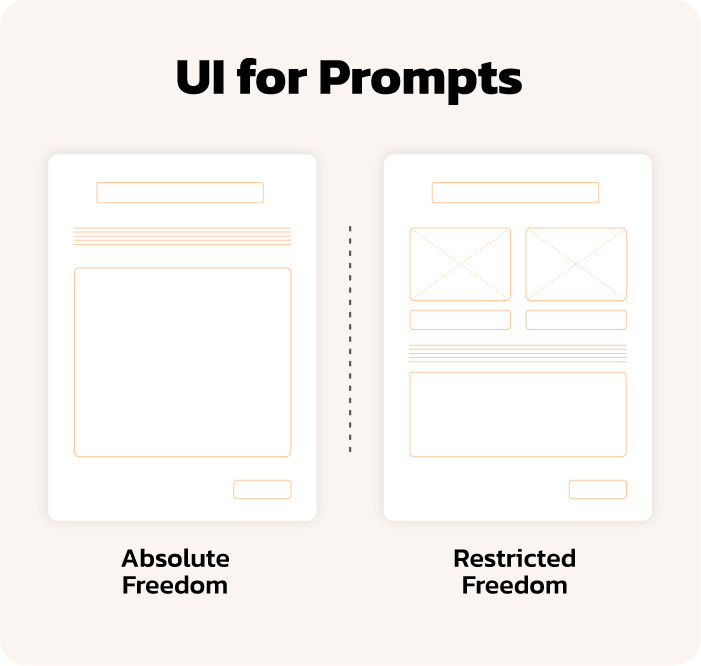
Users were more satisfied with the results while still enjoying creative freedom. Exposing base prompts and configurable fields allowed them to explore alternatives more freely, while maintaining reliability through a controlled prompting context.
A well-designed interface that effectively represents the range of composition possibilities allows us to provide high flexibility while guiding users toward positive, business-aligned outcomes. This improves the overall user experience and ensures consistent, trustworthy results.

