


Think about this: you spend two hours on a feature, open a pull request, and thirty seconds after CI picks it up, the build turns red. Not because of a logic error but because of a missing semicolon, a line that's twelve characters over the team's max length, or worse, an API key that got accidentally hardcoded during debugging and never cleaned up.
The time it takes to fix something like that is not important, maybe 30 seconds. But that's not really the point. The point is that there's a chain of things that happens when you push your final changes to your CI agent and now has to be repeated: making changes to code you already considered done, triggering a new pipeline run on your CI agent, reviewers looking at this new change… Individually, none of that might seem like a big deal. But when it happens multiple times in the same week, it becomes annoying and starts wasting time exponentially.
Git has a hook system built directly into its operation.
It's a group of scripts that run at a specific point in the Git workflow. For example:
Each hook is just an executable file located in .git/hooks/. Git runs it at the right moment, checks the exit code, and either continues or stops based on the result.
The mechanism is simple: a script that, depending on its exit code, either causes Git to stop the operation and show you why, or lets it proceed normally.
This is a shift from CI tools, where the environment and configuration are shared. In this case, the Git hook scripts live locally and are responsible for making sure you don't fall into an error when the flow reaches your CI agent.
https://git-scm.com/book/en/v2/Customizing-Git-Git-Hooks
This guide walks through building a local code quality pipeline using Git hooks from scratch. We'll set up a TypeScript project with ESLint, Prettier, and Vitest, then wire up three hooks: pre-commit for formatting, linting, and dependency auditing; commit-msg for enforcing Conventional Commits; and pre-push for type checking and running the test suite. After that, we'll look at how to share hooks across a team using a committed install script and the npm prepare lifecycle, and close with practical advice on keeping hooks fast enough that developers actually use them.
The .git/hooks Directory
When you run git init, Git creates a .git directory at the root of your project. Inside it, among other things, lives a hooks/ folder pre-populated with sample scripts; one for each hook Git supports.
In that same folder you'll see files with .sample at the end of their name. This is Git's way of giving you examples without activating these scripts throughout the workflow.
The rule for execution is simple: the hook must exist, have the exact name without an extension, and be executable. Nothing more.
To review what's commonly present in a Git project after running git init:
To activate the pre-commit sample, for example:
The script can be written in any language your machine can execute: shell, Python, Node.js, Ruby. The only thing Git cares about is the exit code. Exit 0 and Git continues normally. Exit anything else and Git stops the operation and prints whatever your script wrote to stdout or stderr. That output is what the developer sees in their terminal when a hook fails.
The Three Hooks That Matter for This Guide
Git supports a long list of hooks covering everything from rebasing to garbage collection. For a local code quality workflow, three are relevant:
The practical split is: pre-commit catches issues in seconds, pre-push catches issues that take longer but still before the remote is involved.
The Bypass Problem — and Why It's Not a Flaw
You can bypass pre-commit simply by adding --no-verify to your git commit. The same flag works for pre-push. This surprises people who expect hooks to be enforceable when they're not.
This is actually the right design. Hooks are a convenience tool, not a security mechanism. There are legitimate reasons to bypass them: committing a work-in-progress that you know is broken, being in the middle of an emergency fix and needing to push something fast, or the hook itself having a bug.
Forcing developers into a system they can't escape breeds resentment and workarounds.
The implication is important: hooks are not a substitute for CI. They are a first pass; a fast, local filter that catches the obvious issues before they ever reach the pipeline. CI remains the authoritative gate. A developer who bypasses a hook will still hit CI. The goal of hooks is to make that failure rare, not impossible.
The Sharing Problem
There is one structural limitation worth understanding before building anything: .git/hooks/ is not tracked by Git. When a developer clones your repository, they get your source code but not your hooks. This means hooks installed directly in .git/hooks/ are invisible to everyone else on the team.
The solution? There is a pattern which this guide follows: keep your hook scripts in a committed directory (config/git-hooks/) and provide an install script that copies them into .git/hooks/ and makes them executable. The hooks live in version control, the install step is a single command, and every developer's local environment ends up identical.
Project setup
Before writing any hook, we need to create the files and download the necessary dependencies for this example (TypeScript):
Configuring ESLint and Prettier
As of ESLint v9.0.0, flat config is now the default configuration format and the previous .eslintrc format is officially deprecated. Create eslint.config.js at the project root:
https://eslint.org/docs/latest/use/configure/configuration-files
Prettier config
https://prettier.io/docs/configuration.html
Scripts to package.json so the hook may called them cleanly
Type module is required to import statements in eslint.config.js won’t fail.
The pre-commit hook
This is the hook that does most of the work. It runs on every git commit against the staged files and that's why it needs to be fast and targeted. A hook that takes 30 seconds will be bypassed. One that takes 3 seconds will be used.
config/git-hooks/pre-commit
A few things worth explaining here:
https://docs.npmjs.com/cli/v10/commands/npm-audit
The commit-msg Hook
Most teams have a commit message convention. A JIRA ticket prefix, or something custom. The commit-msg hook enforces it. Git passes the path to a temporary file containing the message as the first argument to the script, so you read from that file.
This hook enforces the Conventional Commits format (type(scope): description), for example: feat:, fix:, chore:, docs:, etc.
config/git-hooks/commit-msg
The merge commit bypass matters in practice. If you leave it out, every git merge on the command line will fail because merge commit messages like Merge branch 'main' into feature/x don't follow Conventional Commits format.
https://www.conventionalcommits.org/en/v1.0.0/
The pre-push Hook
The test suite and TypeScript type check belong here rather than in pre-commit. Type checking across a full project and running all tests can take anywhere from a few seconds to some minutes depending on the project size, which is acceptable before a push but too slow before every commit.
FYI: If your codebase is huge but well modularized, you may choose which tests to run depending on the module to ease the job for this hook.
config/git-hooks/pre-push
tsc --noEmit runs the TypeScript compiler purely as a type checker which means that it validates the entire project's types without writing any compiled .js files to disk.
This is separate from ESLint: ESLint catches style and pattern violations, tsc catches actual type errors that ESLint's static analysis won't see.
Testing the Hooks Manually
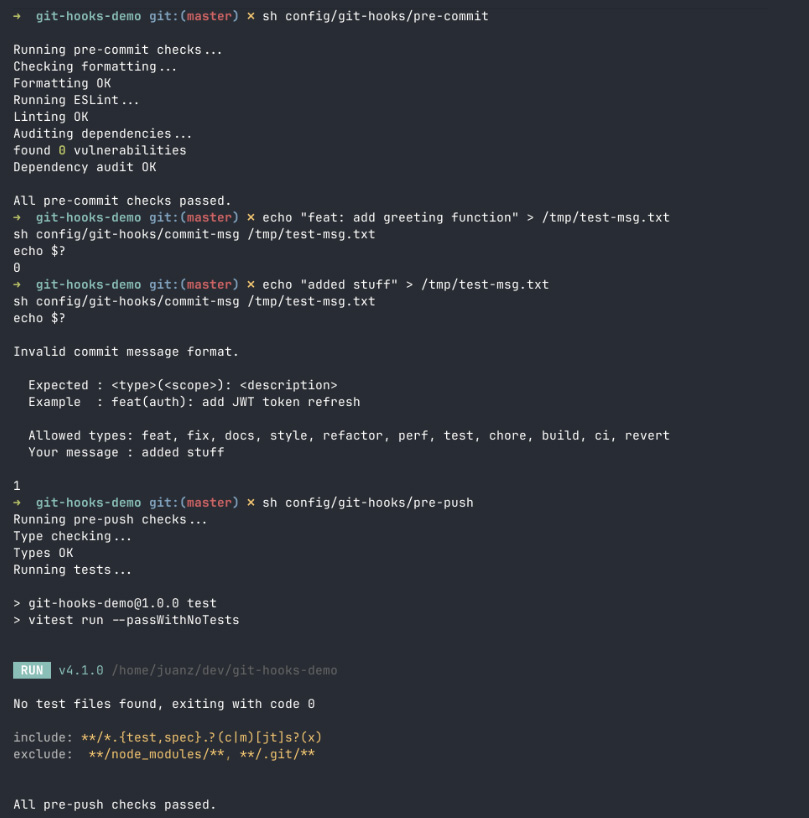
Before running the install script, test each hook directly so you're not debugging them through Git:
Iterating this way by running scripts directly from the shell is significantly faster than staging files and committing just to trigger a hook.
If everything went well, you should see something similar to the logs above.
Why .git/hooks Doesn't Travel With the Repo
When someone clones your repository, Git creates a fresh .git directory on their machine. Whatever hooks you have in your .git/hooks/ exist only on your machine and these files are not part of what Git tracks or transfers. Everyone else starts with the default sample files.
The pattern this guide uses is straightforward: keep hook scripts in config/git-hooks/ as regular tracked files, and provide an install script that copies them into .git/hooks/ on demand. The hooks are in version control. Anyone who runs the install script gets the exact same setup.
https://git-scm.com/docs/githooks
The Install Script
The script copies each hook into .git/hooks/, makes it executable, verifies that required tools are installed, and reports clearly if anything is missing.
config/git-hooks/install-hooks.sh
git rev-parse --show-toplevel returns the absolute path to the repository root regardless of where you run the script from. This means the install script works correctly whether you call it from the project root, from inside config/, or from anywhere else in the tree.
Making the Install Step Hard to Miss
An install script that lives in the repo but that nobody knows to run is only marginally better than no install script. The most reliable approach is tying it to something developers already do when setting up the project.
Add it to package.json as a prepare script:
If you want hooks to activate with zero manual setup (no prepare script, no install command, nothing), Husky handles this by managing core.hooksPath automatically on install.
The tradeoff is adding a dependency and an abstraction layer on top of something Git already provides natively. For the workflow in this guide, the prepare script approach gives you the same result without the extra dependency.
https://typicode.github.io/husky/
A Note on Husky
If you want hooks to activate with zero manual setup like no prepare script, no install command, nothing.
Husky handles this by managing core.hooksPath automatically on install. The tradeoff is adding a dependency and an abstraction layer on top of something Git already provides natively. For the workflow in this guide, the prepare script approach gives you the same result without the extra dependency.
https://typicode.github.io/husky/
Keeping Hooks Fast
The single biggest reason developers bypass hooks is speed. A hook that takes 30 seconds on every commit will get disabled within a week. The design principle is simple: pre-commit should feel instant, pre-push can take longer because it runs less frequently.
The staged-files-only pattern from the pre-commit section is the most important optimization. Running ESLint and Prettier across the entire project on every commit is wasteful. You only care about what's about to be recorded. git diff --cached gives you exactly that scope.
If your pre-commit hook is consistently slow despite being scoped to staged files, the culprit is usually ESLint's startup time on large configs. Running npx on every commit adds overhead because it resolves the binary each time. Replace npx eslint with a direct call to the local binary:
This skips npx's resolution step and shaves noticeable time off repeated runs.
--no-verify: The Escape Hatch
Every hook in Git can be bypassed:
This is not a security issue; it's intentional and it's related to what we already talked about earlier in this article.
Hooks are a developer convenience tool, not an enforcement mechanism. There are legitimate situations where bypassing them makes sense, so there's a reason for --no-verify to exist.
An important thing to notice is that bypassing a hook doesn't bypass CI. A developer who pushes with --no-verify will still hit the pipeline. The consequence of skipping the hook is a slower feedback loop, not zero feedback.
Where --no-verify becomes a problem is when it's used habitually to avoid fixing real issues. If developers are routinely skipping hooks, that's a signal that the hooks are too slow, too noisy, or catching things that aren't actually enforced elsewhere. Fix the hooks, don't normalize bypassing them.
What We Built
Starting from scratch, this guide walked through building a complete local validation pipeline. A pre-commit hook that runs formatting checks, linting, and a dependency audit on every commit, scoped to staged files to stay fast. A commit-msg hook that enforces Conventional Commits. A pre-push hook that runs TypeScript type checking and the full test suite before anything reaches the remote.
An install script that wires everything together in a single command, with tool checks that report clearly if anything is missing.
The whole system lives in config/git-hooks/, travels with the repository, and activates automatically via npm install through the prepare script.

