


One of our AI products needs a really flexible approach to collecting flow rules and behaviors. Getting incorrect information from the fields, skipping a validation, or collecting stale options breaks the downstream logic of our complex engine, so our users can lose thousands and thousands in profit because of a misaligned flow. Because of this, we chose a server-driven UI approach as we needed the server to be the single source of truth for the collected information.
SDUI allows us to specify the frontend interactions and rules from the backend, so it is not possible to get different versions of information. This also gives us a straightforward interpreter, meaning that all the nodes that we declare in the backend, the frontend will know immediately what it should do in terms of rules. Still, also it knows what should be rendered and what interactions the node can expect from the user.
We develop a visual workflow editor. Users can build automation strategies to improve their sales and profitability based on their customers' behaviors.
The real challenge is managing dozens of different nodes, each with its own fields, validation, and business logic. Using SDUI lets our backend manage the contract with the UI.
Each UI Specification specifies its title, node category, and a list of its sections. Every section also has a list of fields that we will explain later; additionally, some fields work as metadata to set interaction rules with other nodes. Information like whether the node can be a leaf or if it has some forbidden interactions is defined right here.
This UI specification class is attached to a single node, so we know that every UISpecification is also a node for us; every piece of basic info is collected in this class.
Every field is a subtype of UISpecificationField that is serialized via Jackson polymorphism.
Doing it this way, each field carries its own information, like validators, conditions for hidden or disabled states based on its own info or info from other nodes. Also, this kind of serialization allows us to define a different set of properties for each field, ranging from simple data like default values or placeholders to declarative side effects that must be interpreted by our front end.
Each section contains a collection of UISpecificationField instances, so every instance of this class is also a field in the entire node; each field has a one-to-one relationship with a node property.
Our frontend fetches all the UISpecifications and caches them. When our users navigate to the flow view, those UI specifications allow us to show specific nodes with custom React nodes (this capability is possible because of the React Flow library).
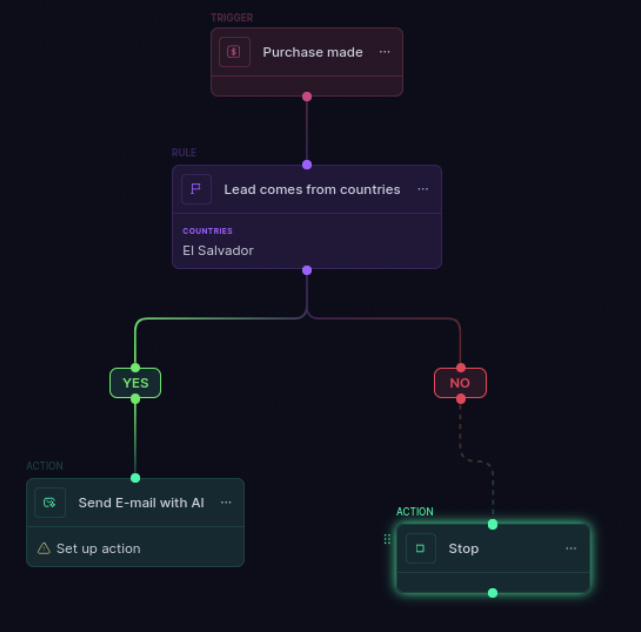
This is a simplified version of our React component for the Trigger node:
Then, when we need to set up user interaction, we display a popper on click, where we let our generic engine build the corresponding form with its own validation handling.
The simplest of our fields is a text field, which shows the user a single text input to interact with.
Every field carries its own validator declaration, so we reuse the validation logic, which uses zod to build dynamic validation schemas based on backend declarations. Our React hook useFieldValidation shares logic to ensure valid forms for our users.
Here is a little summarization of our declarative validation system. Using the useFieldValidation hook lets us work with simple and declarative rules for all our fields, handling the interpretation of rules bound from the backend.
SDUI is a complex pattern, as we have to build an orchestrator in the backend and an interpreter in the frontend, and we need to ensure our system maintains high reliability in providing consistent information. It is not the simplest approach, but it is worth it for this product.

