


Most teams use AI to generate test code, but generation is only half the problem. Without consistent patterns, those tests become flaky and hard to maintain. This article explores how to use AI agents with Playwright not just to write tests, but to enforce quality standards across a test suite. By defining guidelines in markdown files that the AI can read and apply, it becomes possible to validate anti-flakiness patterns, check structure consistency, and flag violations before they reach CI. The goal is to show where AI adds real value in maintaining test quality—and where experienced human judgment remains essential.
Most QA teams reach for AI the same way: autocomplete a selector, fix a syntax error, or copy a snippet from a chat window. It works—but it barely scratches the surface of what AI agents can actually do in a test automation workflow.
The real shift is from AI as a writing assistant to AI as an autonomous executor. An agent does not suggest code—it reads a test case, navigates to the relevant files, writes the test following your project’s conventions, runs it, and iterates until it passes. No manual steps in between. That is the difference between a tool that saves you five minutes and one that changes how your team ships quality.
This article walks through a practical architecture for that shift: how to give AI agents the context they need to generate reliable Playwright tests, which interface to use and why, and how three specialized agents—Planner, Generator, and Healer—cover the core test lifecycle. It also covers where this approach delivers clear value and where human judgment remains essential.
The workflow described here is being actively implemented. The patterns are real; the tooling—Claude Code, OpenCode, Playwright CLI, and Playwright MCP—is production-ready today.
Before configuring a single agent, there is a more important question: what will the agent read?
AI agents do not invent quality standards—they apply the ones you give them. If your test cases are vague, your folder structure is inconsistent, and your conventions exist only in someone’s head, the agent will produce tests that reflect exactly that. The quality of what goes in determines the quality of what comes out.
Two things need to be in place before any agent touches your codebase:
Well-defined test cases in your TCMS. The agent reads the test case as its primary input. A test case that says “verify the checkout flow works” gives the agent nothing actionable. One that specifies the exact URL, preconditions, step-by-step actions, expected outcomes, and test data gives the agent a contract it can turn directly into code. The specificity of your test cases is the ceiling of what the agent can produce.
A strict POM structure with written guidelines. The Page Object Model is not new, but its role changes when an agent is involved. The agent needs to know: where do locators live, how are fixtures defined, what naming conventions apply, which anti-flakiness patterns are required. This knowledge must exist in written form—in markdown files the agent loads at runtime. An AGENTS.md at the project root, complemented by skill-specific reference files in your .agents/ directory, is what transforms the agent from a generic code generator into a collaborator that knows your project.
The time spent writing clear guidelines pays off on every test the agent generates from that point forward.
Playwright offers two interfaces for agent-based automation: playwright-cli, a command-line tool designed for coding agents, and the Playwright MCP server. Choosing the right one has a direct impact on how much context your agent can use within a single session.
The Playwright documentation states the distinction clearly:
"Playwright-CLI is best for coding agents (Claude Code, GitHub Copilot, etc.) that favor token-efficient, skill-based workflows. CLI commands avoid loading large tool schemas and verbose accessibility trees into the model context.”
In practice, this means:
For a test generation workflow where the agent is simultaneously reading existing code, following guidelines, writing files, and running tests, CLI is the right choice. The context window is a finite resource—every token spent loading verbose tool schemas is a token not available for your POM, your rules, or the test case itself.
MCP remains valuable when the agent needs to spend significant time exploring an unfamiliar UI—mapping interaction flows before generating any code. The two interfaces are complementary, not competing. A well-structured project will likely use both depending on the task at hand.
Playwright ships with three built-in agents that work with Claude Code, OpenCode, VS Code, and other coding tools out of the box:
specs/tests/, verifying selectors live as it navigatesUsed sequentially, these three agents can take a plain-language request and produce a working test suite. That is genuinely useful, especially as a starting point for teams new to agentic testing.
The limitation is context. Playwright’s built-in agents operate from a generic system prompt. They do not know your project’s fixture patterns, your naming conventions, which locator strategy you mandate, or which anti-flakiness rules your team enforces. A generated test may be technically valid Playwright code and still violate every standard your team has established.
One practical note: agent definitions—the instructions and MCP tools each agent uses—must be regenerated whenever Playwright is updated. Running npx playwright init-agents after each upgrade ensures the agents use the latest tools and instructions.
The built-in agents provide the foundation. Custom agents built on top of them are what make the workflow production-ready for a specific codebase.
The following agents extend Playwright’s built-in approach with project-specific context. Each is defined as a markdown file: a skill or subagent definition that combines a system prompt, tool configuration, and references to your project’s guidelines. The coding agent loads them on demand, keeping context lean until each one is needed.
5.1 Test Planner
The Planner’s job is to produce a test case ready for the Generator to consume. The input can be a feature description, a user story, or a product requirement. The output is a structured plan that includes: the target URL, preconditions and test data requirements, step-by-step actions, and the exact expected outcomes for each assertion.
What separates a custom Planner from Playwright’s built-in one is the format it produces. The built-in Planner outputs a generic Markdown plan. A custom Planner outputs a test case in the exact structure your project and TCMS expect—complete, unambiguous, and ready to pass directly to the Generator without manual reformatting.
For teams that already maintain test cases in a TCMS, the Planner’s role shifts: rather than creating the test case from scratch, it reads the existing ticket and validates that it has enough detail for the Generator to work with. Missing data, ambiguous steps, or undefined expected outcomes are flagged before any code is written.
This agent is the most exploratory of the three. The Generator and Healer have well-established patterns; the Planner’s exact workflow depends heavily on how your team manages requirements and what level of detail your test cases already contain.
5.2 Test Generator
The Generator covers the full lifecycle of turning a test case into production-ready Playwright code.
Phase 1 — Read and verify the test case. The agent reads the ticket, summarizes the scenario, identifies the relevant pages and components, and confirms which existing fixtures and page objects apply. It does not write a single line of code until this phase is complete. This prevents the agent from making assumptions about structure that conflict with what is already in the codebase.
Phase 2 — Create the test using Playwright CLI. The agent uses the CLI to navigate the application, interact with elements, and build the test structure. CLI keeps token usage low while allowing the agent to verify selectors live against the running application. The agent also checks the existing codebase to avoid duplicating files or page objects already present.
Phase 3 — Apply guidelines iteratively. This is where the custom agent diverges from the generic one. The agent reads the project’s guidelines—locator hierarchy, fixture usage, naming conventions, and anti-flakiness rules—from the .md files loaded in context and iterates until the generated test conforms to every rule. A generic agent has no project guidelines to reference and skips this pass entirely.
Phase 4 — Anti-flakiness validation. Before the test is considered done, the agent runs it repeatedly:
A test that fails even once in ten runs does not proceed. The agent investigates the failure, applies a fix, and re-runs. This is the final automated quality gate before a human reviews the result.
5.3 Test Healer
The Healer activates when a test that previously passed starts failing—in CI or locally. The trigger is a specific failing test, not a full suite run.
The repair loop operates with full project context:
That last step is the most important one. A healer that silently fixes every failure can mask genuine product bugs. The agent’s job is to repair tests that break because of implementation drift, not to make broken features look green.
The three agents described above do not need to be three separate sessions. In tools like Claude Code and OpenCode, there can be three skills within a single session, loaded on demand as the task requires.
This matters for context management. A session that loads every guideline, every page object reference, and every agent definition at startup will exhaust its context window before the first phase completes. The solution is progressive disclosure: load only what is relevant, only when it is needed.
A practical structure for this is a dedicated .agents/ directory at the project root—tool-agnostic and readable by Claude Code, OpenCode, or any agent that supports skill-based workflows:
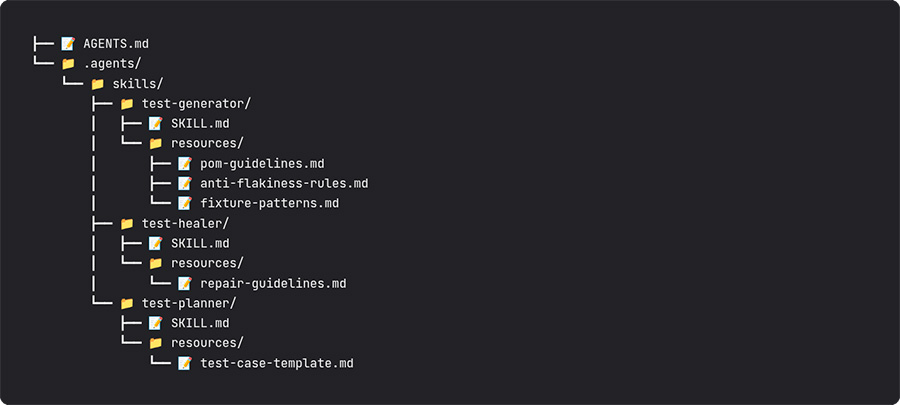
Each skill’s SKILL.md defines the agent’s system prompt and which resource files to load. Resources load lazily—they are available but not in context until the skill is invoked. This keeps each session lean without hiding domain knowledge that may be needed mid-task.
The practical entry point for each workflow becomes a single command:
The agent reads the input, loads the relevant guidelines from resources/, and executes its phases autonomously. No manual steps, no copy-pasting between tools, no context switching.
Hooks add a deterministic enforcement layer on top of the agent’s own judgment. A PostToolUse hook can trigger an ESLint run every time the agent writes or edits a test file—catching violations that the agent’s guidelines might not cover. This creates a quality gate that runs regardless of which agent wrote the code.
Being precise about this distinction is what separates a realistic adoption of AI agents from an overconfident one.
AI agents handle reliably:
Human judgment remains essential for:
The most effective teams treat AI agents as amplifiers of their existing standards, not as replacements for them.
The bottleneck is not generation—it is consistency. Most teams can already generate a Playwright test with a single AI prompt. The problem is that each generated test reflects the assumptions of that specific prompt, not the standards of the project. Agents with explicit guidelines close that gap by making consistency a property of the process, not of the individual who wrote the prompt.
The interface choice has compounding consequences. Choosing CLI over MCP for coding agent workflows is not a matter of preference—it is an architectural decision with direct impact on how much the agent can reason within a single session. Token-efficient workflows preserve context for what matters: your code, your guidelines, your test cases.
Three agents cover the core test lifecycle. Planning, generation, and healing are distinct triggers with distinct flows, but they share the same quality standard: a test does not pass until it runs cleanly and consistently. That shared bar is what makes reliability a structural property of the suite rather than a per-developer habit.
The AGENTS.md is the agent’s frame of reference, not the agent itself. The quality of your guidelines determines the quality of every test the agent will ever produce. Time invested in writing clear, specific, well-organized rules pays compound returns. A feedback loop that updates those rules based on what the agent gets wrong is what makes the system improve over time.
Autonomous does not mean unsupervised. Agents that silently fix every failure or generate tests without human review create a false sense of coverage. Every agent output should be reviewed by a QA engineer before it reaches CI—not to redo the work, but to verify that the test validates the right behavior and to feed corrections back into the guidelines. That review loop is what keeps the system honest.
AI agents change what is tedious, not what is important.

